
Appearance
Getting Into Your Course
How course access works, why a course needs no password, and what to do when you can't get back in.
Your email link is your key
When you register for a course, you're given a profile on that course and emailed a link. That link is how you get back in. It's unique to you, and it returns you to exactly where you left off — your videos, your quiz attempts, your progress.
The link is the one big button in your confirmation email. Your provider chooses the wording, so it may read Go To Your Course, Complete Credit Requirements or something of their own. Every later email about the course — reminders, "starting soon" notices — carries the same button, and any of them gets you in.
A course needs no password, because registering for a course doesn't create a login.
"But I got a Set Up My Password email"
That's for a LecturePanda account, not for the course. You get it if you ticked the create an account box when you registered. Your course link works with or without it. See Your Account & Learning History.
Keep the email
The registration email is worth keeping until you've finished the course and saved your certificate. If your course has several parts spread over weeks, this link still opens the whole course every time. Emails about one part — a session starting soon, a part that has just opened — take you straight to that part, but they are the same key to the same course.
A LecturePanda account is a separate, optional thing. It doesn't replace your course link, but it does give you a permanent home for all your courses and certificates. If you keep losing the email, that's the real fix — see Your Account & Learning History.
Request a new link
You can send yourself a new link without asking anyone:
- Go to the course's registration page — the same page you originally registered on.
- Find the message near the top that starts "Already registered?"
- Click resend your personal access link.
- Enter the email address you registered with, and click Resend Email!

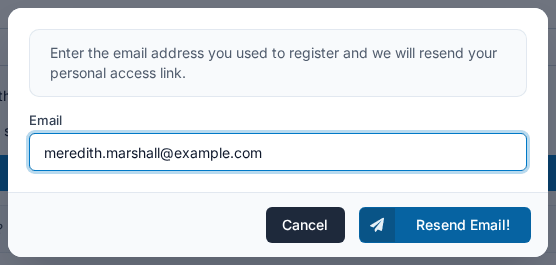
The link arrives at that address within a few minutes. If nothing arrives, check your spam or junk folder before trying again.
Use your link, not the registration page
The registration page starts a new registration. If you fill it in again, you get a blank second profile instead of the one holding all your progress. Always come back through your emailed link.
If you can't remember which email address you registered with, or which course it was, your course provider can look you up and resend it.
The link won't open
Some workplace email systems — common in hospitals, government and large companies — disable or strip links out of automated messages. The link looks greyed out, or clicking it does nothing.
Three ways around it:
- Copy and paste it. Right-click the link, copy the address, and paste it into your browser's address bar.
- Ask your course provider to resend it from their own email account. They have a button that does this, and mail from a person usually gets through filters that block automated mail.
- Create a LecturePanda account using the same address you registered with. Your courses then appear in your account and you don't need the email at all. See Your Account & Learning History.
If the page opens but shows an error, check that the address starts with https://. A link shared without it works in Chrome, which fills the prefix in automatically, but Safari doesn't and will refuse to open the page.
It asks me to confirm it's me
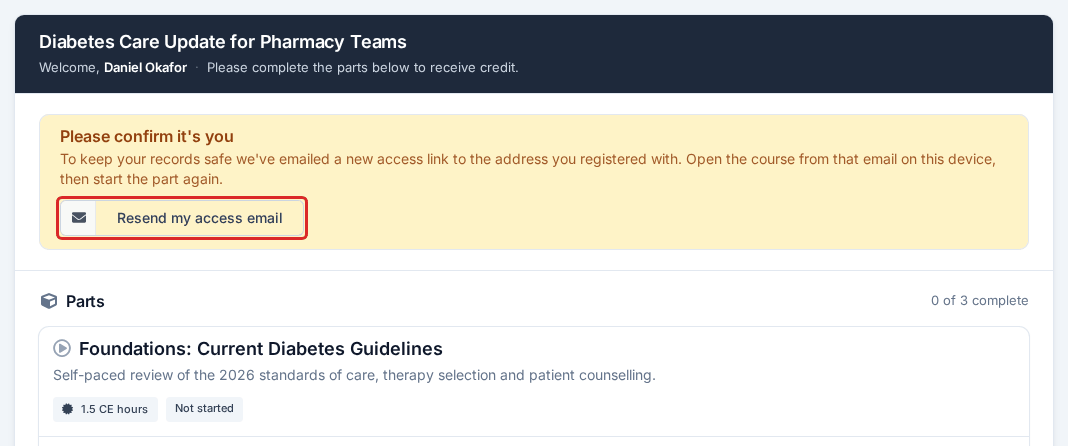
On a course with several parts, pressing Start This Part on a phone or computer you haven't used for this course before can bring up a notice headed Please confirm it's you. It protects your record; nothing is wrong.
- A new access email has already been sent to the address you registered with. Look for it, including in spam.
- Open it on the device you want to use and click Confirm Identity and Continue.
- Press Start This Part again.
If no email arrives, click Resend my access email on the notice. The button comes back after a minute if you need to send another.
A part of my course won't open
A part that reads Locked, Closed or Opens with a date is not an access problem — the course is set up that way. A part that is locked or closed explains each one.
It says I'm already registered
This is the system protecting your progress, not rejecting you.
You registered for this course before, so instead of creating a second profile it points you back to the one you already have. Follow the prompt back into your existing profile, or request a new link to the address you registered with.
I think I lost my progress
Almost always, the progress is fine and you're looking at a different profile.
Here's how it happens. You registered, came back weeks later, couldn't find the email, and registered again — this time with a different address, maybe your personal one instead of your work one. That second registration created a brand-new profile starting from zero. Your original profile is untouched, with every video and quiz exactly as you left it.
To get back to it, request a new link using your original email address. If you're not sure which one that was, your course provider can search their registrant list for you.
Changing the email address on a registration
If you registered with an address you can no longer reach — a work account you've left, or a typo — ask your course provider. They can change the address on your registration and resend your link to the new one.
Related
- Your Account & Learning History — the permanent alternative to hunting for emails
- Working Through a Course — what to do once you're in
- Getting Help — who to ask when you're stuck