
Appearance
Registration Security
Set access controls on who can attend this lecture.
This page describes the classic pages
In the new course builder these controls are their own page, Registration › Security. There each control is a rule in a table — Add a rule to turn one on, Remove to turn it off — and the fields inside each rule are the ones described below. Two things are only in the course builder: an Email domains rule, and an Access Codes section for creating, emailing and tracking the unique sign-in codes.
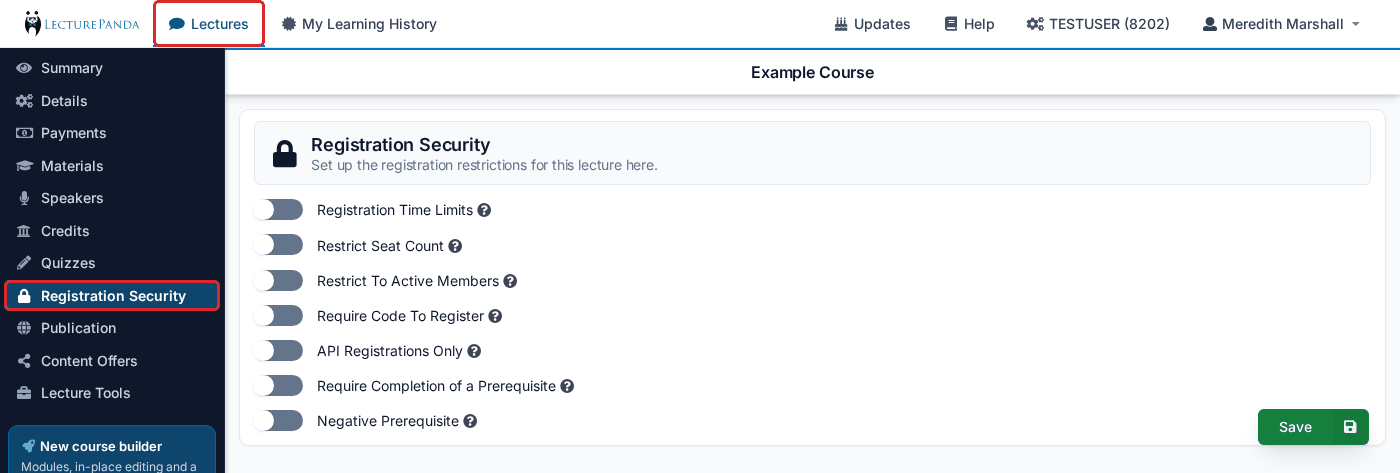
Registration Time Limits
Set a registration open and close date: Registration Opens On and Close Registration On.
TIP
Even if your lecture is an enduring event, we recommend putting a close date so that years from now you don’t need to remember to turn off the lecture.
Restrict Seat Count
Set a Seat Count. Once this limit is reached, no new individuals will be able to register for this lecture.
Restrict To Active Members
Use one of the membership checking options to determine who can register for this lecture. Pick the membership database, Membership Domain Email list or Email List under Membership Account. To see more info on membership checking, click here.
Error Message For Non-Members is optional: your own wording for what someone sees when they try to register and are not a current member.
Require Code To Register
Requires each participant to enter a unique 6 character code before signing in. Set Number of Unique Sign In Codes Needed to slightly more than the number of participants you expect — each participant needs their own code, and you need to give it to them before they can register.
In the course builder the same codes are managed as Access Codes on Registration › Security: add them in batches, email each one to its participant from the page, and see which have been used.
WARNING
This is an access gate, not a discount. If you want to give people free or reduced-price registration, use a discount code or receipt code instead — see Codes & Free Registration.
API Registrations Only
Closes the registration page entirely and requires that participants be registered by a third-party system using the Basic Auth credentials from your account page. Use this when an association management system or another platform owns enrollment.
Third Party Sign Up Page is required: the URL of the page people should be sent to when they try to register here.
Require Completion of a Prerequisite
Forces registrants to have completed a different lecture to be able to register for this lecture. Choose it under Select Lecture.
INFO
The registrant must use the same email address for both lectures.
Negative Prerequisite
The mirror image of the setting above: it locks out anyone who has completed the courses you select. This is how you stop people re-registering for a course they already took — for example, blocking last year's cohort from this year's edition of the same material.