
Appearance
Learner Validation
The e-Profile ID and date of birth are checked against ACPE while the learner registers, so bad identifiers are corrected before anyone earns credit against them.
Validation happens at registration
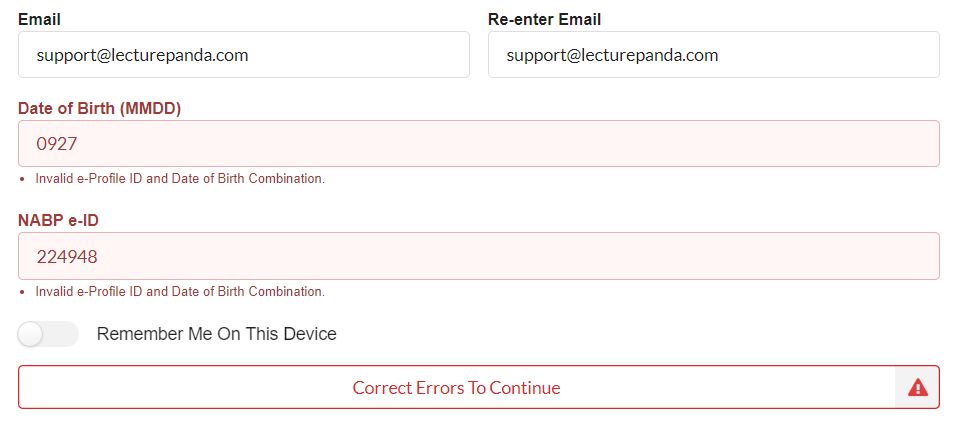
When a registration type collects the NABP e-Profile ID and Date of Birth, LecturePanda sends that pair to ACPE during registration and asks whether it's a real combination. If it isn't, the form says so in place and the learner fixes it before signing up.
This is the same idea as CE Broker's license validation, applied to the identifiers CPE Monitor needs. Catching a mistyped e-Profile ID here costs the learner a few seconds. The same typo found later means a credit that can't be reported, a learner chasing you weeks after the event, and a submission to redo — often near the edge of the window.
This is why a clean report is trustworthy
Because the pair was validated at registration and checked again at submission, a submission that reports clean is strong evidence the credit reached the right profile. When a learner says a credit is missing, the identifiers are rarely the cause — see Reporting & Troubleshooting for where to look instead.
"Invalid e-Profile ID and Date of Birth Combination"
The message means ACPE didn't recognize that pairing. Both fields are flagged, because either one could be the mismatch.
What to tell the learner:
- Check the date of birth format. CPE Monitor expects MMDD — four digits, month then day, no year. A learner entering a full date is the most common cause.
- Check the e-Profile ID against their NABP account at dashboard.nabp.pharmacy. It has to be their NABP e-Profile ID, which isn't their license number.
- Confirm the birth date on file at NABP matches what they're typing. The check compares against NABP's record, so a birthday that was entered wrong when their e-Profile was created will keep failing until they correct it with NABP.
"This NABP e-Profile ID has already been used to register for this event"
Each e-Profile ID can register once per course. This usually means the learner already registered — often with a different email address, which is why they don't recognize their own earlier registration.
Search the Registrants list for their e-Profile ID or name. When you find the original registration, point them back to it rather than creating a second one; their progress and their credit are attached to it. See Registration & Access for the general version of this problem.
If ACPE is slow to respond
Validation calls out to ACPE's servers, so if they're unreachable the form reports that it couldn't validate right now and asks the learner to try again. It's a temporary state on ACPE's side rather than a configuration problem — registration works normally once their service responds.
Registration types that don't report to ACPE
Validation only runs where a registration type actually collects these two fields. Types built for non-ACPE audiences never ask for them and never hit this check — see Setup for how registration types are configured.